Updating of Optimal Recipes

Updating of Recipes tool allows to store the data of reformulation calculations in order to automatically redo them later if some condition may alter the optimal recipes.

Updating of Recipes tool allows to store the data of reformulation calculations in order to automatically redo them later if some condition may alter the optimal recipes, usually some change in the information contained in the used materials table. The goal is to find the new optimal recipes without the need of re-entering the data with which a reformulation was done.
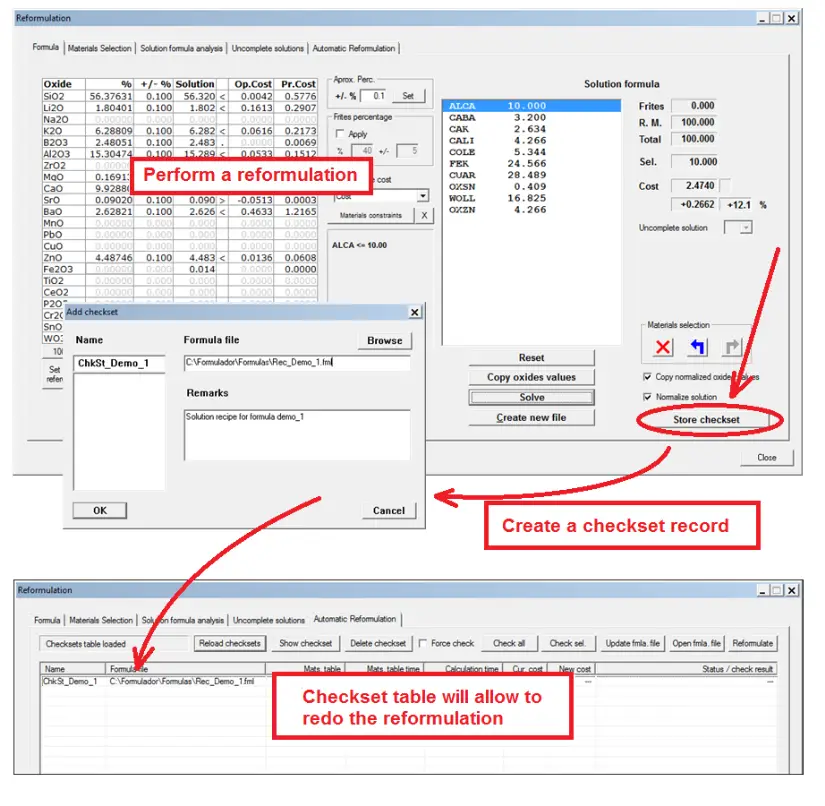
In order to use Updating of Recipes tool:
Perform a reformulation calculation.
Create a record which we call checkset that stores the calculation input data. You must provide a formula file that will store the solution recipe.
Later, when some data in the materials table has changed, access Updating of Recipes page again and execute the check process that will redo the reformulation calculation for the selected records. The check process will report the result.
The new solution recipe can be copied to the formula file specified in the checkset.
Reformulation data can be also transferred to Formula page so a common reformulation procedure can be done in order to review the details.